
Community Forums › Forums › EA Studio › EA Studio Tools and Settings › EA Studio Tools and Settings: Updates
- This topic has 33 replies, 9 voices, and was last updated 2 years, 4 months ago by
Alan Northam.
-
AuthorPosts
-
May 8, 2020 at 7:20 am #47329
Ilan Vardy
ParticipantHi Petko,
Thinking about my question above some more, I think (and please correct me if I am wrong) that what I should do is check the strategies in EA Studio, and compare the long and short entry conditions to see if they have the same or similar conditions?
Thanks,
Ilan
May 9, 2020 at 3:03 pm #47473Petko Aleksandrov
ParticipantHey Ilan,
Good question here which is important to make it clear.
You see the same entry point because the EAs from EA Studio work on the bar opening. And if you trade on M15, this means that when there is a signal from few of the EAs in one bar, they all will open on the opening of the next bar, which looks like the same signal but it is not. It is the same moment and price.
If you keep the correlation analyses checked in the settings, there is no way that you will generate strategies with the same entry or exit rules.
June 25, 2023 at 7:53 pm #178001Alan Northam
ParticipantApproximately two weeks ago “Max spread protection” and “Min equity protection” was added to the Expert Advisor Properties dialog box.
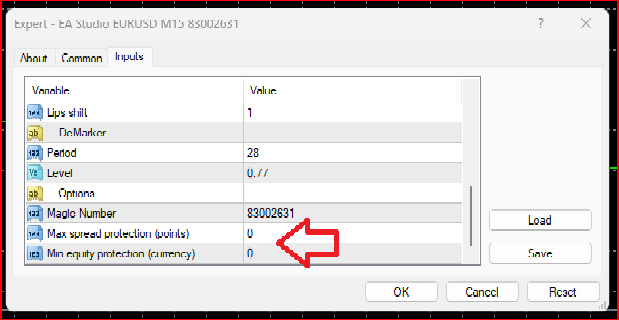
Let’s look at each of these individually to see how they work:
Max spread protection – The spread, or the difference between the bid and ask price of an asset (currency pair), can be large at times and can affect the daily profits and losses of a trader’s brokerage account. During the first couple of hours following the opening of the foreign currency market each day the spread of assets can become quite large. Further, some FX brokers use variable spreads during the day based on the volatility of the foreign exchange markets. now traders can control the maximum spread to limit the effect higher spreads can have on their accounts. As an example: By setting the “Max spread protection” to 50, traders can now limit the spread to 5 pips. What this means is when the spread increases above 5 pips the Expert Advisor (EA) will not place a trade. The only time when an Expert Advisor will open or enter a trade position is when the spread is below 5 pips.
Min equity protection – There will always be a period of time when an Expert Advisor will undergo a drawdown. Sometimes the drawdown will be shallow and sometimes can be quite severe. This addition to the EA Properties box can help protect a trader’s account from a severe drawdown. As an example let’s see how this works: Let’s say you set the “Min equity protection” to $300. This means that if the equity in your account today is $5000 then the maximum drawdown will be limited to $4700. So here is what will happen: When your account draws down to below $4700 any open position will be closed and the Expert Advisor will be removed from your MetaTrader chart window.
*Always test new options on a demo account before using them on a live account to verify they are working as expected!
**Personally, I do not like the idea of using dollars to set the minimum equity protection. I would rather it be in percent of equity. I have requested this option to be added.October 17, 2023 at 6:57 pm #205256ParticipantTo update to the latest version of EA Studio use Ctrl + F5.
-
AuthorPosts
- You must be logged in to reply to this topic.