
Community Forums › Forums › EA Studio › EA Studio Tools and Settings › EA Studio Tools and Settings: General questions
Tagged: saç, saç bakımı
- This topic has 46 replies, 19 voices, and was last updated 4 months ago by
Ilan Vardy.
-
AuthorPosts
-
June 20, 2023 at 7:08 pm #177270
Alan Northam
ParticipantEA Studio needs these 300 bars so the indicators used in the EA will have a sufficient lookback period so they will start working correctly over the time frame you are interested in observing. 300 bars where each bar is 4hrs indicates you need at least 3 months of data history. Are you using your broker’s historical data? If so you need to maximize the broker’s history data in MT4. If you don’t know how to do that I will provide a link to a video to show you how this is done. The other option is to use the Premium Data in EA Studio.
June 28, 2023 at 5:39 am #178590Simon Watti
ParticipantHi, my name is Simon Watti and I would like to first convey my profound gratitude for the great service you are offering people like me. I started forex trading almost three months ago from scratch and was fumbling around in the dark till I watched your introductory guide to Algorithm trading. and I am not turning back. Thank you for the 50 free EAs I got a few days ago, I have put them on my demo account to filter those that are compatible with my broker’s data (Exness). I actually generated and downloaded twenty EA from the EA Studio and also put them on the demo account. My challenge is that I had not learned how to keep them in the collection and just deleted them and yet I may need them again for recalculation seeing that I am not generating any more now (I do not know why because I am using the same settings as guided in the videos and user guide). Kindly let me know how to convert the downloaded EAs to JSON format that is required for the upload to the EA Studio.
Thank you so much once again. Kind regards.June 28, 2023 at 5:49 am #178654ParticipantSimon,
Select Validator and drag and drop EAs into the Strategies box.
Or, Click on the Strategies box, navigate to the EA, click on EA, and click on Open to import EA into the Strategies box.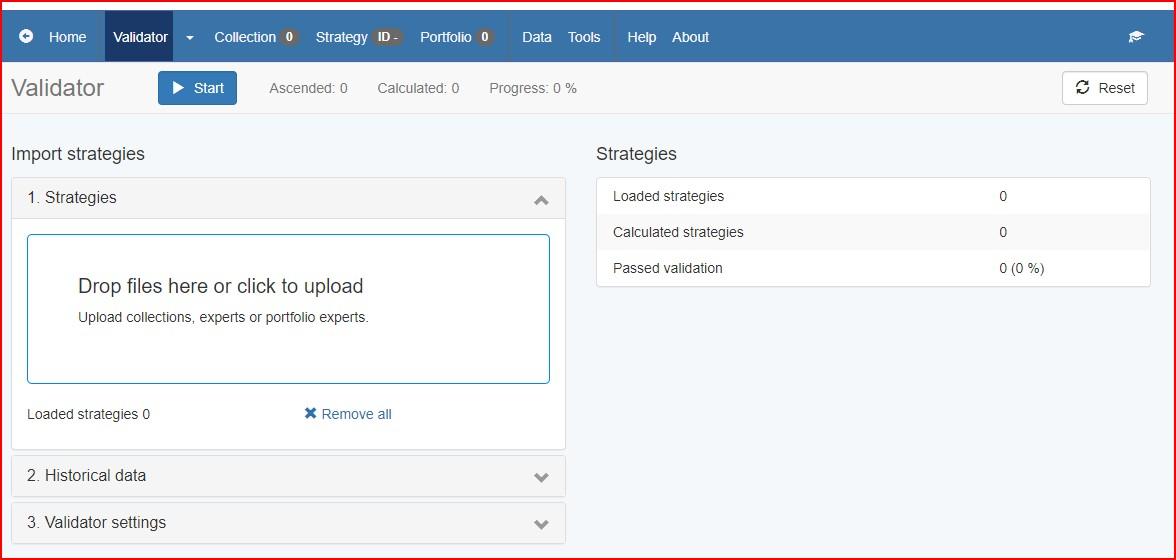
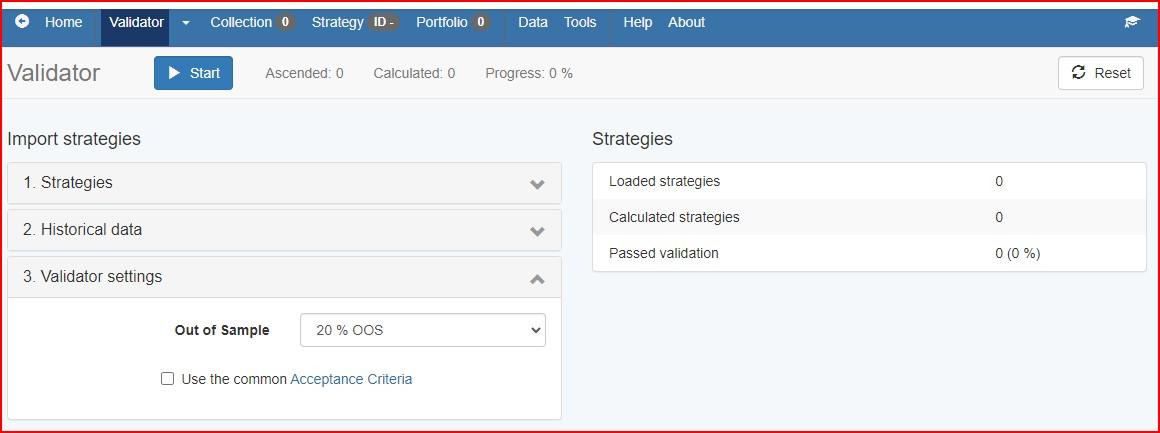
Uncheck the Acceptance Criteria box.
Uncheck all these boxes.
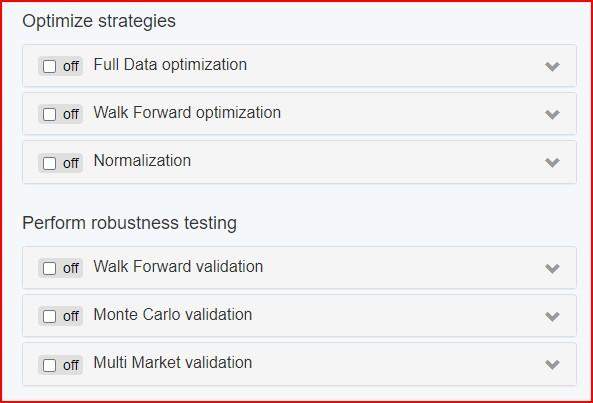
Click on Start and all the EAs will now be back in the Collection.
 February 14, 2024 at 6:20 am #234383
Balfred Castillo
ParticipantHello I was wondering how can i add a Dashboard to the EAs along with the Daily Drawdown protection and Over all account equity drawdown protection? Thank you
February 14, 2024 at 11:57 am #234415ParticipantHi Balfred,
When you create Expert Advisors with EA Studio the downloaded EAs when installed on MT4 or MT5 will have a Dashboard showing the status of the EA. The EA will also have Daily Drawdown protection, account equity drawdown protection that can be setup in the EAs properties dialog box.
Alan,
November 11, 2024 at 4:41 pm #377178AdvanceFxRobot
ParticipantHi there,
Has anyone managed to get EA Studio to generate trading strategy for S&P500 USA50IDXUSD)? I have tried many times despite low performance expectation but the EA studio didn’t generate any profitable strategy. If you can make it profitable, please share with me some idea.
Thank you,
Ken
December 21, 2024 at 2:35 pm #385046Graham Ferguson
MemberIs there any way in EA Studio to create your own top 10 experts in the program rather than having to save everything offline?
May 19, 2025 at 11:37 pm #452197Alessandro Santini
Participanthallo! I downloadd prop n1 where i can work on usdyen. I need info on couple of settings. Max loss in the video was about 9k but you were working on a 10k demo account. What should i put on a prop of 200k with daily max dd of 10 and overeall dd of 20k?
Further, the face do not turn in happy fave, i have an ongoing trade with a loss, could it be the motivation for not working?
June 12, 2025 at 3:28 pm #455786Valentinozerus
ParticipantHi Alen,
Could you please answer a quick question for me?
When I create a portfolio using Expert Advisor Studio, is it possible—like with a regular Expert Advisor—to set the portfolio to “only long” or “only short”?
I’m still in the testing phase, and since I’m using the trial version, I can’t check this feature myself.
Best regards,
Sebastian
June 12, 2025 at 11:03 pm #455847Samuel Jackson
MemberHi Sebastian,
No this is not possible. The portfolio EA is comprised of many individual EA strategies and each could have different rules for long only, short only etc BUT at the portfolio level you cannot just change this on all of the EAs.
Also you should not want to be able to do this as each EA should be tested individually and this may not be beneficial for many of the strategies in a portfolio.
The portfolio EA is only really to make the final trading part easier and have to load less EAs on less chart.
October 17, 2025 at 6:41 pm #473927Simon Chong
ParticipantHi there,
I hope you can assist me with a few questions regarding EA Studio.
1. I’ve noticed that EA Studio doesn’t seem to offer a “short only” strategy option. Since CFDs support short positions, I was wondering if there’s a specific reason for this or if I’m overlooking something.
2. Could you please explain how to effectively use the “Opposite Entry Signal” feature?
3. I’m interested in creating an EA for swing trading. My goal is to develop a strategy that continuously moves the stop loss higher as the price increases, until a retracement occurs. Could you provide guidance on how to implement this within EA Studio?
October 21, 2025 at 3:39 pm #474018MemberHi, typically short only are pretty risk since there’s no actual limit to the losses I guess. It wouldn’t be that useful, some markets have a long bias generally such as gold but why trade a market with a short bias?
The opposite entry signal is used if you have an open position it will either ignore this and maintain the original position and wait for tp/sl or close OR if its reverse then it will close the position and open the opposite position (so long if was short for example).
October 21, 2025 at 3:39 pm #474019MemberHi, typically short only are pretty risk since there’s no actual limit to the losses I guess. It wouldn’t be that useful, some markets have a long bias generally such as gold but why trade a market with a short bias?
The opposite entry signal is used if you have an open position it will either ignore this and maintain the original position and wait for tp/sl or close OR if its reverse then it will close the position and open the opposite position (so long if was short for example).
October 21, 2025 at 3:43 pm #474020MemberFor your swing strategy you will need to using the trailing stop loss, and you will need to find a combination of indicators that is good at confirming a retracement.
If you don’t have indicators in mind then I guess you could generate some and look at the charts to see when trades are opened and if they align with retracements.
I think better to do this manually likely in the editor though and play with indicators and parameters to see if you can match this to the market you are interested in.
Fsbpro could be useful if you find yourself wanting to use indicators not available in EA Studio
October 24, 2025 at 5:44 pm #474157ParticipantHi Samuel, a ‘short-only’ strategy might be considered less risky when the market is bearish (for example, with BTC). Purely for educational purposes, how would one create a short-only signal?
-
AuthorPosts
- You must be logged in to reply to this topic.