
Community Forums › Forums › EA Studio › EA Studio Tools and Settings › EA Studio Tools and Settings: General questions
Tagged: saç, saç bakımı
- This topic has 46 replies, 19 voices, and was last updated 4 months ago by
Ilan Vardy.
-
AuthorPosts
-
May 29, 2021 at 5:06 am #88952
jammerly
ParticipantI use EA Studio to generate EA’s for Crypto.
However I’m not sure how to get all the symbol settings correct.
For example, say I am using a crypto that has a price of $.55555.
In custom symbol settings I set the digits to five and that uses the correct prices.
But I’m not sure what number the spread should be set at.
The actual spread I’m trading at is $.00005
When I import the data its setting it at 10 in the symbol settings. Is this correct? I could use an in depth explanation of how it calculates it and what happens when you change digits.
Also how can I properly enter the commission? Is value you enter for entry and close, or just one side of the trade?
Say my commission for entry and close, both sides of the trade combined = .1%. So actual commission per 1 lot with a price of $.55555 is $.0005
How do I enter that into the symbol settings under commission?
Also I usually raise the lots in the symbol settings so it will be trading 100 lots. That makes it easier to see the balance in the charts.
But sometimes if I put in 100 for lots it actually trades 1000. If i set it to 10 lots it trades 100. Why is that?
Also, by changing lots does that affect the way I need to enter commission? Is commission based on just 1 lot or the number I have entered under lots?
Thanks for your help to clarify all this.
June 1, 2021 at 4:09 pm #89194Petko Aleksandrov
ParticipantHey Jammerly,
Yes, you should make the symbol settings exactly the same way you see it with your broker.
The commission depends on the brokers. Some charge one time, others twice.
Can you upload some screenshots about the lots. Where do you see the change, in MetaTrader or in the EA Studio backtest?
Cheers.
July 15, 2021 at 5:49 pm #93333ricardo lagonegro rick
ParticipantHi
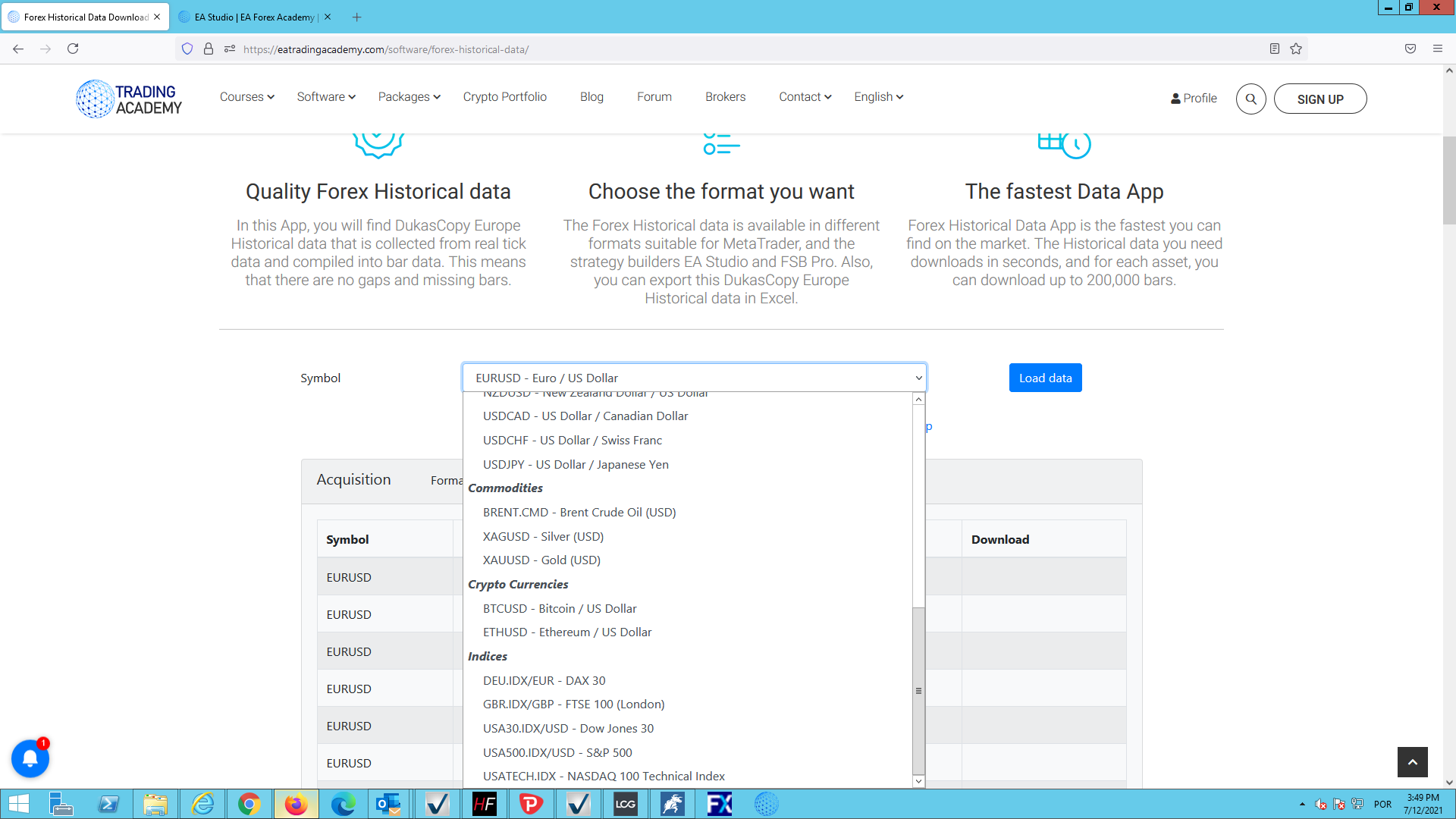
Where is symbol of share) amzn, goog, tesla, aapl, fb ) in ea studio professional and forex historical data ?
 July 15, 2021 at 5:49 pm #93663Participant
Hey Ricardo,
For the moment that data is not available. I use Darwinex broker to get Historical data for stocks.
Cheers,
August 30, 2022 at 2:16 pm #122347Alan Northam
ParticipantWhen I download my EA collections they go to my laptop Download file. I there a way to download my EA collections to another file?
August 31, 2022 at 12:44 am #122389Samuel Jackson
MemberHi Alan,
I assume you mean download to another folder?
This is controlled by your browser. Just go into your chrome settings and change the default download folder in there.
August 31, 2022 at 9:06 am #122413ParticipantThank you!
March 30, 2023 at 11:22 am #149940Patrick Vale
ParticipantI took EA Pro course watched all the video. On EA Studio trading sessions option. Do you enable or disable it? I know swap charges holding pairs overnight. How about no trade on Sunday? I know on my own experienced Sunday spread are very high. Any advice pro and cons? Thanks!
March 30, 2023 at 11:23 am #149515ParticipantHi, New member purchased the EA professional course. On the trading Sessions option. Check all boxes: do not trade on Sunday, close at the end of the sessions and close at Friday close? or leave it uncheck? Pardon my grammar second language.
March 30, 2023 at 10:10 pm #149990ParticipantPatrick,
If you want to trade 24/5 then you do not need to do anything with the Trading Sessions option. If you want to limit trading to certain hour then all you need to do is to adjust the range of trading hours for the days you want to limit trading. If you do not want to trade on Sunday to avoid high swaps then all you need to do is to check the box “Do Not Trade on Sunday”.
Hope this helps!
AlanMarch 30, 2023 at 10:13 pm #149991ParticipantI answered these questions in your other post.
Alan
March 31, 2023 at 2:03 am #150003MemberHi Patrick,
Yes just set things for how you want to trade, also if you are intending on doing prop challenges then need to meet their requirements, for example some don’t allow open trades over weekends.
Also it’s a good idea as you have said to avoid opening trades during high spread periods.
I would definitely recommend customizing your setting a for how you intend to trade before generating.
May 23, 2023 at 1:35 pm #167063Jaylon Nichols
MemberI have another question about Trading Session.
What time zone are the Trading Sesion filters using?
Like are they using the time zone of your data? Or are they using UTC time?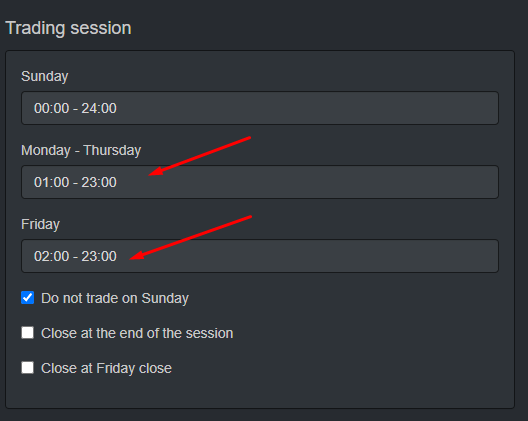 May 23, 2023 at 1:36 pm #172946Participant
Yes, it is the timezone of your historical data. This is what EA Stduio uses.
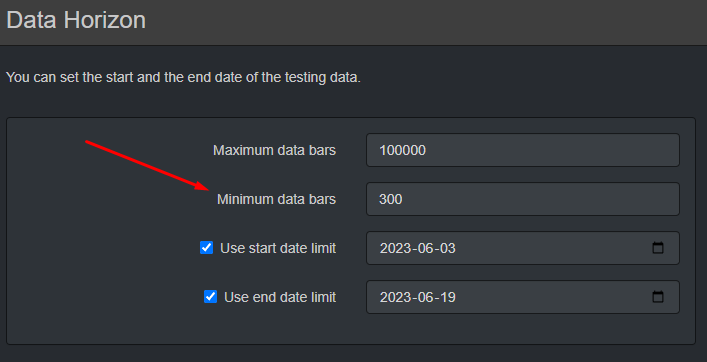
June 20, 2023 at 6:04 pm #177134MemberLet’s say I want to see how my strategies have performed over the last month, but I can’t because there are only about 137 4hr bars in one month. What do I do? I set the minimum number of bars to 100, but when I refresh the page, it returns to 300.
-
AuthorPosts
- You must be logged in to reply to this topic.