
Community Forums › Forums › EA Studio › EA Studio Tools and Settings › EA Studio Tools and Settings: General questions
Tagged: saç, saç bakımı
- This topic has 46 replies, 19 voices, and was last updated 4 months ago by
Ilan Vardy.
-
AuthorPosts
-
February 22, 2017 at 10:54 am #435388
Stoyan Stoyanov
ParticipantIn this topic, traders can post their general questions about tools and settings of EA Studio.
P.S. Please use the Reply button if you want to reply to a specific comment. This would make the topic organized and easier to navigate through and will reduce number of duplicate questions.
April 16, 2020 at 7:15 pm #45343vietcuong_gf
ParticipantHello Petko and trading friends,
After some time of working around with EA Studio, I’m impressive with its capacity of creating nearly infinite numbers of Expert Advisors. However, the key point is we need to have a good combination of common acceptance criteria so that it can generate enough good Expert Advisors in not too long time. That’s the point where Petko’s experience comes into play to help us. I suppose many of you are having the same questions below and I hope Petko will help us with it.
1a) What are your frequently used Common Acceptance Criteria and their frequently used values?
(I know we may have many combinations of common acceptance criteria such as minimum count of trades, minimum profit factor and it depends on the taste of each trader. The more acceptance criteria, the longer it may take to find a strategy. However, I believe after a long time of using EA Studio you find a good balance point, where we can set common acceptance criteria to generate good strategy but don’t cost much time for weeks or months to generate.
1b) In a course, you have set the following Common Acceptance Criteria: 1. Minimum system quality number: 0,98; 2. Minimum r-squared: 60; 3. Minimum profit factor: 1.2; 4. Minimum count of trades: 350. Are these criteria often used by you and in accordance to your experience of trial and error, are these criteria good enough for EA Studio to generate decent strategies?
1c) Do you use any other combination of Common Acceptance Criteria in addition to the above frequently used ones (mentioned in 1a, 1b)? If yes, may you please share your experience with us?
2. Usually how many Calculated Strategies (I mean the total number Reactor has generated, not the strategies put into Collection) have you had each time?
(Initially, I wanted to ask how long do you run Reactor each time, however, I think this question is useless since it depends on the power of each one’s computer. If your computer is so strong, you only need one night to generate totally 3 million strategies and that big number of strategies could provide decent final good strategy to put into Collections. So I’d better ask how many Calculated Strategies you have for each run so that I can calculate the needed time to run).
I have some more questions, but I think it will make my post too long. Furthermore, I want to have more posts so that Petko will give me discount for his course as promised. So let me post another question on another post.
Thank you Petko and trading friends in advance for answering me.
Cheers,
Viet Cuong
April 18, 2020 at 4:53 pm #45379Simon Chong
ParticipantHi Petko,
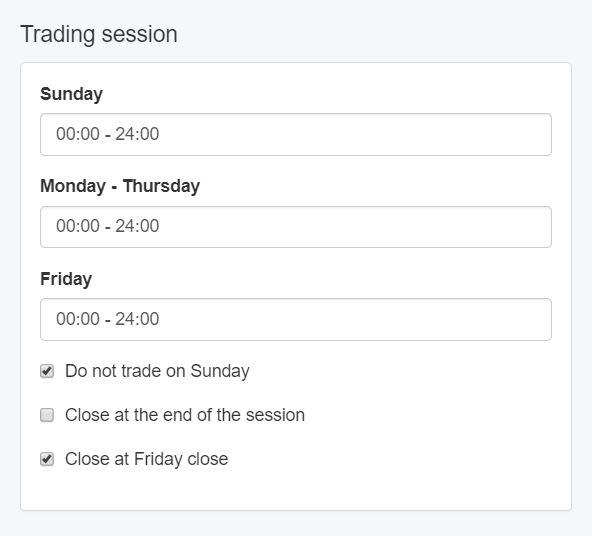
Is it possible to set the EA for EA Studio to close all trade on Friday? I tried the below setting, it seems not the way I want it to be.
 April 20, 2020 at 8:33 am #45403
Petko Aleksandrov
ParticipantHello, and welcome to the Forum!
Glad to hear you have many questions. This means that you are getting into the details.
1. It is important to find the balance of acceptance criteria for your Historical data. The number of bar matters here. If you have a small number of bars and you set strict acceptance criteria, you will not see any strategies in the collection.
Yes, these are criteria where I follow and do some changes if it is needed.
There is a Topic in the Forum about the Acceptance criteria, and many traders shared their way.
Simply, start with any acceptance criteria that you find logical, and you will see if you need to stricter or not.
It is better to have more strategies in the collection from where you can filter again.
2. When I generate strategies, I want to have at least 10 strategies that passed all the criteria and robustness tools.
Depends on the asset and what the plan is for the trading, sometimes I go for above 30 or 40. Just leave it longer or loosen the criteria.
April 20, 2020 at 9:21 am #45411ParticipantHello Simon,
Yes, you need to check the Friday Close, but you need to change the hour.
What time does your broker close on Friday? If they close exactly at 24:00 you need to change it to 00:00 – 23:45.
Because the EA will execute the close after the new bar is opened, and if the market is closed, it will not be able to close the trade.
So just do it 15 min before the close.
April 23, 2020 at 6:37 pm #45548Augustine
ParticipantThanks petko,
I needed that too.
Most times charts do not continue exactly where it ended on Friday, which could negatively affect previously opened trade by the time markets opens on Monday.
April 24, 2020 at 10:25 am #45574ParticipantHello Augustine,
This is because there is Sunday trading which most of the brokers with MetaTrader don’t show. It is available with some of the paid platforms.
This is why there is a gap between Friday and Monday.
However, that is not really an issue because we use the Historical data where Sunday trading is not included.
So the EAs are expected to handle it. Don’t spend a lot of time on that.
Regards.
May 6, 2020 at 2:48 pm #47086Ilan Vardy
ParticipantHi Petko,
I have some EAs which are performing exceptionally well. Problem is, I can’t remember exactly which settings I used when creating them.
Is there a way to know, through EA Studio (or any other way) the settings which were used to create them? Perhaps upload them to EA Studio to reverse engineer them? Apologies if this is a silly question.
Thanks,
Ilan
May 9, 2020 at 2:39 pm #47467ParticipantHey Ilan,
Glad to hear that you succeeded to create EAs with good results.
I don’t think you can understand the settings you used.
What I do is to keep a spreadsheet with all the settings I use for the different set of EAs.
For example, I have a column for the EURUSD strategies where I used 1.2 PF, R- Squared 80 Sl range 10-50 TP Range 50-90 etc.
And then I organize the EAs in folders according to the settings I used. So far I think this is the easiest way to organize your work.
Another thing which requires a bit more work is to organize your EAs using the Magic Numbers. For example, you can use the first 2 symbols for the currency pair. 01 – EURUSD 02 – GBPUSD. After that, you can have the Time Frame 05 – M5, 15-M15. Then you can have the acceptance criteria which you selected to use.
Hope these tips might give you a better idea of how to organize your work.
May 20, 2020 at 9:43 am #48060ParticipantHi Petko,
In the Tools menu of EA Studio, where one can change the Trading session times – which time zone is this in – GMT, my local PC time, etc?
Thanks, as always.
Ilan
May 21, 2020 at 2:16 pm #48313ParticipantHi Petko,
In the symbol settings in the tools menu of EA Studio, where you can add the commission amount, would that be commission for a full 1 lot (assuming the lot size settings is 100,000)? So if I am creating strategies for an entry of 0.01 lots, an the broker charges $7 for 1 lot, 0.7 for 0.1 lot and 0.07 for 0.01 lot, does the system automatically adjust the commission, or do I put in commission for the 0.01 lots?
Thank you,
Ilan
May 22, 2020 at 9:00 pm #48537ParticipantHello Ilan,
no, you need to synchronize it with your broker’s time.
Some brokers synchronize the time with your local but some don’t.
To make it sure, you can look at the market watch, and see what is the hour with the broker.
May 23, 2020 at 4:13 pm #48619ParticipantHey Ilan,
You place it for 1 lot, and the system will calculate how much it is for any different quantity.
Cheers,
May 25, 2020 at 7:57 am #48786ParticipantThanks Petko
May 25, 2020 at 7:58 am #48787ParticipantPerfect, thanks as always
-
AuthorPosts
- You must be logged in to reply to this topic.