
Community Forums › Forums › EA Studio › EA Studio Tools and Settings › EA Studio Tools and Settings: Experience and Results
Tagged: #acceptance criteria, EA Studio, FTMO-Data
- This topic has 286 replies, 38 voices, and was last updated 1 year, 6 months ago by
Alan Northam.
-
AuthorPosts
-
August 1, 2022 at 12:13 pm #120479
Samuel Jackson
MemberHey Alan,
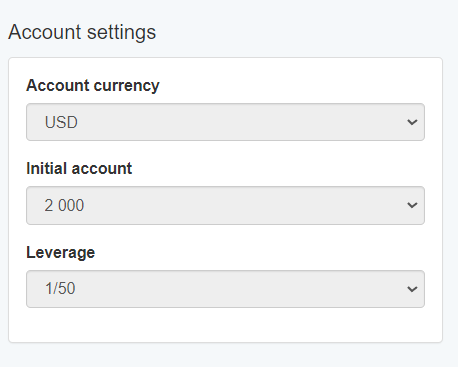
I checked out your settings file and I see the issue :-). You are using a 0.1 lot size on an account that is too small. Presumably this is the account settings you intend to trade so you should definitely be setting the lot size in the strategy properties to 0.01. I would also increase the range of the take profit and stop loss a bit.
I will email you back the modified settings file that added a couple of strategies to the collection in about 5 mins.
I’d probably recommend that you increase the account size/ leverage a bit during the generation and then can check on your account size/leverage using the validator. This will help you get a feel for the threshold values that are sensible.
I personally just use a 10k account with 100:1 leverage using a 0.1 lot size (pretty much the default) during generation.
Also in the data horizon uncheck the start date box and just have the bars set and the end date set. That’s just my preference though. Hope you checked out that thread and video also 😉
Let me know how you get on.
August 1, 2022 at 12:47 pm #120481Alan Northam
ParticipantI uploaded the modified settings file into EA Studio. After running for 15 minutes EA Studio collected 1 strategy. This could equate to 4 strategies per hour and 40 strategies after 10 hours. I will let it run and see what the results are.
I also wonder how the changes to the settings will affect simulated trading…
August 1, 2022 at 2:37 pm #120484ParticipantAfter 2 hours of running the modified settings for EA Studio has only collected 2 strategies :o(
August 1, 2022 at 2:48 pm #120488MemberHmm, I’ll take another look in the morning Alan. That was the thing that stood out but perhaps I was too hasty in thinking that was the issue.
As to how those changes would affect the simulated trading, shouldn’t be a problem as long as a semi sensible portfolio.
I’ll actually quickly set it running on my computer and see how it looks in the morning also okay 😉
Also please keep yours running overnight and I I’ll likely want a couple of screenshots from you in the morning to compare. I just loaded that file to Ea studio and hit run on reactors and in 3 mins have 2 added to the collection, will see how it looks in the morning though.
August 1, 2022 at 2:53 pm #120489Petko Aleksandrov
ParticipantHey guys,
I just had a look at this topic and will try to help you out.
Now, if you see the error message it does not mean it will not find strategies. It is just a warning that for 2 min the reactor did not find anything but if you leave it running, you might see results.
I am just running the monthly updates and for GBPUSD M15 I keep it to 300 мин trades and 1.2 Profit Factor.
More, you can try lowering the number of bars to 100000 so the reactor will work faster.
And by the way GBPUSD is a hard one to find a lot of strategies 🙂
August 1, 2022 at 9:32 pm #120503ParticipantI guess my EA Studio trial is ending today. If I order the EA Studio Pack now can I upgrade to the Optimal or Mega Pack later?
August 2, 2022 at 12:25 am #120507ParticipantWell, I broke down and ordered the Optimal Pack. Waiting for email with Key…
August 2, 2022 at 1:30 am #120510MemberHey Alan,
I checked my reactor this morning and had 42 strategies in collection. That’s from running the same settings as you but I changed the account settings to default.
I have set it running again with your account settings so will update you tonight.
meantime I would suggest using the default account settings as this will be absolutely fine as long as you are trading a portfolio of say around 10 EAs (which you should be).
Also you setting look good btw, except that I would change the normalizer to 20% OOS to match your generator.
Optimal pack is Avery good choice btw Alan. I’d focus on EA studio for now but it’s excellent value to get FSB pro for the extra cost as you develop as a trader you will be glad to have both options 🙂
August 2, 2022 at 10:34 am #120537ParticipantHi Samuel,
Thanks for emailing the settings. I noticed in the post above you suggested I change the normalizer to 20% OOS to match the generator. However, in the settings you emailed to me you did not make this change. Which way are you now suggesting?
August 2, 2022 at 10:58 am #120538MemberHi Alan,
I noticed that after I had sent you the settings so change to 20% for normalizer.
Also my reactor using your settings generated plenty of strategies throughout the day? Can you confirm that you are now generating plenty strategies with these settings (About 40-50 over night?). Hopefully the issue is resolved now? If not then please send me a screenshot of your reactor page after running all day. Cheers Sam
August 2, 2022 at 11:32 am #120540ParticipantHi Samuel,
Just now changed normalizer to 20% OOS. I will let it run for 10 hours and then report my results.
I do wonder however, if I have several unrelated web pages open in my Chrome browser if they have any affect on the performance of EA Studio.August 2, 2022 at 12:50 pm #120548ParticipantHey Alan,
Glad to have you on board! Yes, you can always upgrade.
It would be best if you run the generator/reactor in a separate browser. It would work faster.
August 2, 2022 at 1:43 pm #120555ParticipantHi Petko,
Are you saying if I run EA Studio on a second copy of Chrome on the same pc? So open one instance of Chrome for EA Studio and a second instance of Chrome for other work on the same pc would allow EA Studio to run faster?
August 2, 2022 at 2:48 pm #120597MemberHi Alan,
Yes that is what Petko is saying and it is definitely the case.
Make sure that you close other unneeded applications and browsers when running the reactor. Also take note of the number of strategies generated and not just the number making it into the collection if you’s want to gauge how optimally EA studio is working.
My rough rule of thumb is to run a separate window running a single instance of EA studio per processor core.
Also make sure that your browsers are active, you cannot minimize them. This is the main reason I want to see a screenshot actually, I want to see how many strategies have been generated rather than added to the collection. I suspect the window may be going inactive.
After an overnight run the number of generated strategies should be many hundreds of thousands and maybe even over a million depending on computing power.
Hopefully that’s the issue as I really don’t think it’s to do with the account settings like I originally suspected.
Oh and always use chrome of course 🙂
August 2, 2022 at 11:07 pm #120639ParticipantHi Samuel,
After running for 10 hours here is the result of the EA Studio Reactor:
Generator
Generated strategies 55008
Passed validation 11 (0.02 %)Normalization
Calculated strategies 11 (2075)
Normalized strategies 10 (90.91 %)
Passed validation 11 (100.00 %)Monte Carlo validation
Calculated strategies 11 (231)
Passed validation 4 (36.36 %)My thoughts is that there are not enough generated strategies. I think this may be because I have too many webpages and MT4 accounts running at one time. Since I have my 10 MT4 accounts running I don’t want to close them for 10 hours to test this theory. So, I will wait until the weekend when I will cold boot my laptop (i7 processor) and will just open on instance of EA Studio and let it run for 10 hours to see how it works.
I know I can only run EA Studio on one laptop but can it be any laptop? I have another laptop that I do not use. I could use it to run this test during the week so I could have results by tomorrow morning. If I don’t hear from you I will give it a try this evening and I could have results in the morning.
-
AuthorPosts
- You must be logged in to reply to this topic.