
Community Forums › Forums › EA Studio › EA Studio Tools and Settings › EA Studio Tools and Settings: Experience and Results
Tagged: #acceptance criteria, EA Studio, FTMO-Data
- This topic has 286 replies, 38 voices, and was last updated 1 year, 6 months ago by
Alan Northam.
-
AuthorPosts
-
April 29, 2021 at 9:22 am #84735
JordyTr971
ParticipantHello,
Can I ask you why you don’t use OOS of EA Studio and do it manually ?
> I have also narrowed it down to one particular pair that performs well and I also only run my EAs on a 4 hour window each day when the markets are most active and the markets are not crossing over from one another…..”
So you are generating your EAs also on a 4 hour window each day by using the “Trading Session” ?
Thank you
April 29, 2021 at 11:50 am #84810richard
ParticipantI hold back the previous week of data and then run the strats forward on that week using the validator. This is basically doing a one week OOS. I prefer to use the validator to do this as it gives me more filtering options and allows me to load large amounts of strats. It allows me to set slightly different run times or whatever other filters I choose for testing purposes…
Yes After much testing I have decided to focus on the 4 hour London / US overlap. This is the most active session of the day. Also I have noticed that when a new market session opens it can sometimes reverse the current market, so I try to line up as many things as I can in my favour….
I also only want to trade a pair that has both of their respective banks open during that session which is why I am focussing on the GBPUSD for now….
I create my strats on the 4 hour overlap only. I have done comparisons of creating them over a 24 hour period and the overlap and the overlap shows more promising results….. So for me I set the sessions to 1515 – 1845.
April 29, 2021 at 12:21 pm #84812ParticipantThis is my summary of algo trading and what has brought me to this point that I feel works for me. (I could be wrong???)
Put a large amount of time / filters / robustness tests into creating a smaller number of EAs that are tuned to run for a longer period of time and ride out the drawdowns with confidence that your EA will work in the longterm.
Create a larger number of EAs with less robustness filters etc… Allow them to run forward and filter them on the fly….. Replacing them on a more frequent basis to keep them aligned with the market.
I am just more comfortable with the second.
If you watch enough of Petko’s videos ( And I recommend that you do) you will see there are 2 main filtering systems that he utilises.
1.) Create your strats, run them forward on demo, filter the top performers ( with PF, WL etc) and transfer them to live account.
2.) Create your strats. Leave them for a week / month. Load them into validator and pick the top performers and transfer them straight to live. Or hold back a week / month run them through the validator and transfer to live.
So for me I chose to use both filtering systems as this gave me better results….. I create my M1 strats over 8 weeks of data, not using the previous week. Then run them forward on the validator for one week, giving me the top 100 / 200 or whatever. (Pre-filter). Then to demo. After they meet my criteria on demo they go to live for the rest of that 4 hour session.
I hope that makes sense….. I have probably gone on too much…….
April 29, 2021 at 2:47 pm #84831ParticipantThank you very much for your precise answer.
More I am using EA Studio and more I am thinking of putting less effort into Filtering ea with robustness tests.
Because we can never be sure the EA’s will perform in the future no matter what robustness tests we are doing.
I may just want to generate a bunch of EAs (3k+) then put them on Demo and transfer the top performer to live account.
I’ve do that in the past but with only 100 EA’s so with a much larger portfolio I think I have much larger chance to have profitable strategies.
October 22, 2021 at 11:38 am #99675ivonemisters
ParticipantHey Richard,
I have been following your work in the Forum, but you haven’t posted anything recently? How is it going with the automated software that you developed to track the EAs?
November 2, 2021 at 9:26 pm #100023Paul Oliver
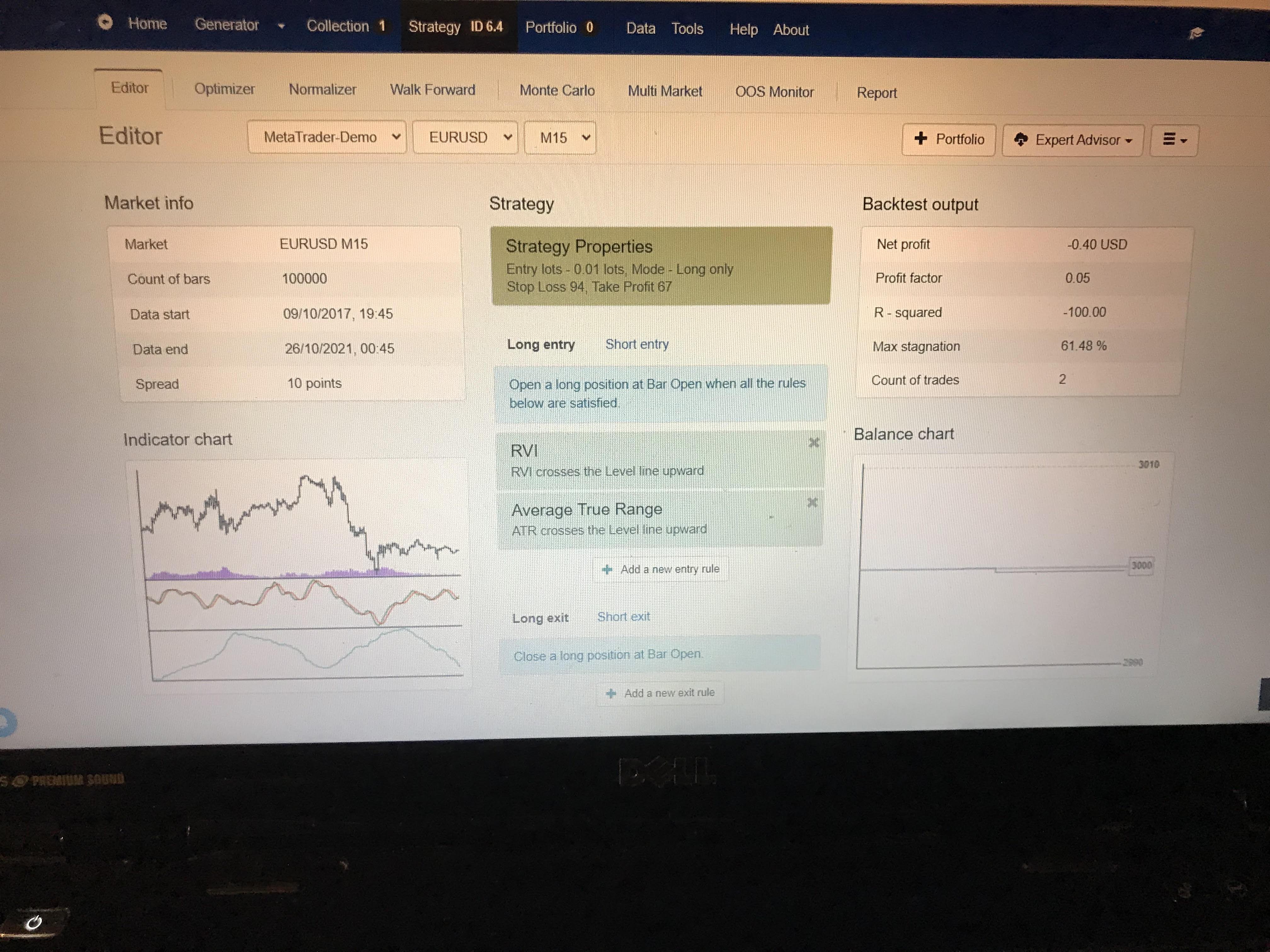
ParticipantHi, I’m trading with .o1 lot; I tried setting up the strategy like Petko’s beginner video. I have taken a screenshot of my results. Can you please take a look and let me know what I’m missing? Or a way I can do improve the strategy, so it’s profitable.
Thank you,
Paul
 November 2, 2021 at 9:28 pm #100334
Petko Aleksandrov
ParticipantHey mate,
It looks like you had only 2 trades…are you sure you implemented the strategy as it is shown in the video?
Which video are you looking at?
Did you try to see the results with the Premium Data?
January 2, 2022 at 9:39 pm #104763SteveM2025
ParticipantHi Petko
Is it possible on EA studio to create EAs that only trade a certain day of the week? I know in tools you can adjust the trading session times on Sundays and Fridays, but Monday – Thursday are grouped together. I know i could simply switch off auto trading in my MT 4 terminal on the days i don’t want to be trading but that doesn’t work when i am testing multiple EAs in one MT 4 account, ie i might want some to trade only Monday, some only Tuesday, some only Wednesday etc, but turning off Auto trading at 00:01 on a Tuesday morning would turn them all off that day. I realise I could also individually take the EAs off charts on the days i don’t want them trading but that is a pain. It would be far easier if you could test for EAs that work well on a certain day and then when you create the EA, it would already include the code to say it would trade that day only. Any help would be appreciated. Thanks.
January 4, 2022 at 5:48 pm #105086ParticipantHey Steve,
I got your point. Everything you said is correct, so the one thing I can do is to suggest that option to Forex Software and see if they will add it as an option.
Cheers,
February 28, 2022 at 5:23 pm #110379ParticipantPlus, you can a rule Long Only which I doubt I showed in the video. Not for Forex. 🙂
March 8, 2022 at 10:05 pm #111289Samuel Jackson
MemberHey Richard,
Been reading through this thread and really resonated with your posts. Are you still on here? Sounds like you were honing in on success for sure to me so expect you are too busy enjoying your millions.
If not then it would be great to hear how you are getting on, especially with regards to getting stable results that stay within the strict guidelines of the prop challenges?
From what I have read my approach and use of EA Studio is very much aligned with yours so I really do hope we haven’t heard from you because you are too busy enjoying your profits!!
March 8, 2022 at 10:11 pm #111291MemberAlso lots of other strong voices in here that haven’t been heard from in while (Andi, Haliffa, Roman, Jaquin2002).
Anyone about, how have your results been going?
March 12, 2022 at 7:06 pm #112436ParticipantHey Samuel,
Thanks for keeping up the spirit in the Forum! I appreciate it! 🙂 I am sure the others will join again.
July 30, 2022 at 8:13 pm #120228Alan Northam
ParticipantWhen running the Generator or Reactor for the 15 minute and 60 minute time periods how much bar history should be used to get an accurate result?
July 31, 2022 at 1:02 am #120235MemberHey Alan, not sure what you mean by accurate but I’m assuming you mean reliable and robust.
To be able to have any kind of faith in the strategy it’s important that it has been backtest over a significant period and has made a significant number of trades in that period.
Personally I use about 5 years data for both M15 and H1 and set the minimum trades to 300. Obviously this will be 4x more bars for M15 so will take longer to generate strategies, but it is also easier to pass the minimum 300 trade criteria for M15.
Hope that answers your question? Using less is fine as is using more, that’s just what I use 😉
Also to get this amount of data use the Premium data or historical data app
-
AuthorPosts
- You must be logged in to reply to this topic.