
Community Forums › Forums › Cryptocurrency › Cryptocurrency: Settings and Inputs
Tagged: Bitcoin Robots, cryptocurrency
- This topic has 62 replies, 1 voice, and was last updated 2 days ago by
Gamebai1grcom.
-
AuthorPosts
-
April 11, 2024 at 4:53 pm #248042
Marin Stoyanov
KeymasterYou’re welcome!
Kind Regards,
NikosApril 12, 2024 at 11:25 am #248182romolusne
MemberGood morning Nikos,
Hope you are doing well!
In the robot system – it has been coded to watch the margin level percentage? If the robot does not check what can I do – if the robots are eating my margin level percentage?
May do you have any videos about how to trade with the robots? And what to check?
Thank you in advance!
Best wishes,
Edina
April 12, 2024 at 4:01 pm #248249KeymasterHello Edina,
So, the only way to see the margin level percentage is by opening a position. You can open a small one manually to see how it is working and then close it.
But what the Bitcoin robots have as protection is a daily drawdown, which means that when the amount reaches to a specific amount that you have set as a loss, it will stop trading. So, with this option, it is not possible to get stopped out by margin if you set it to an amount that is not for example the whole amount of the account.
There is also an equity drawdown which means that if an open trade, reaches to an equity of the amount that you have set, it will close the position.
About the video, I have already provided you one on how to manage the EAs and there should be some settings as well. If you have not watched, I suggest that you do as it has most of the information you need!
In case you do not have the video, here it is:
Hope this helped!
Kind Regards,
NikosApril 12, 2024 at 4:26 pm #248257MemberHi Nikos,
Thank you for you answer, but what I was meant – If my margin level is low – why the robots entering a position? In the video basically said that we do not really need to do anything – or change anything. But if a position has been open by the robot – and suddenly went against it decision – why is it making another entry, if my margin level is low?
Hope you will see the point of my view. The video does not say this.
Best wishes,
Edina
April 13, 2024 at 1:32 pm #248408KeymasterHello Edina,
I am sorry for the late reply.
So, probably the reason it opens another entry when the price gets in the opposite direction is part of the strategy so that cannot be changed.
Thank you!
Kind Regards,
NikosApril 14, 2024 at 2:31 pm #248602MemberThank you Nikos!
April 23, 2024 at 10:26 am #250958MemberGood morning Nikos,
I am trying to download the history for the robot – but when I download the history for the blaze market metatrader 4 it is in a format that the platform – robot – is not accepting. Do you have any solution maybe for this please?
Best wishes,
Edina
April 23, 2024 at 1:30 pm #250998KeymasterHey Edina,
So, where are you downloading the history from?
Thank you!
Kind Regards,
NikosApril 23, 2024 at 3:30 pm #251021MemberHi Nikos,
From Metatrader 4 – Tools – History Center – or shall I download it from somewhere else?
Best wishes,
Edina
April 23, 2024 at 5:16 pm #251040KeymasterHi Edina,
That is actually the way to do it. Have you tried on a different broker?
I think it could be that the robot might not be reading the historical data from this broker.
Kind Regards,
NikosApril 23, 2024 at 6:11 pm #251053MemberThank you Nikos,
I will try!
Best wishes,
Edina
April 23, 2024 at 6:26 pm #251057KeymasterHey Edina,
Sure, give it a try and let me know if it worked!
Thank you!
Kind Regards,
NikosApril 23, 2024 at 6:56 pm #251060Boyan Todorov
MemberHi Nikos,
just a basic question about the functionality of the crypto robots. As they can only be applied to mt4 or mt4 what brokers are available for trading because the classic crypto exchanges like Binance, Kraken or Bitget do not support metaquotes? Thank you!
Boyan
April 23, 2024 at 9:43 pm #251095KeymasterHello Boyan,
So, the crypto robots are not working on cryptocurrency exchanges. You can see what brokers we are using that do use Metatrader in the link below:
https://platform.algotradingspace.com/trusted-brokers/
Hope that helps!
Let me know if you have any other questions!
Kind Regards,
NikosApril 24, 2024 at 10:00 am #251208MemberGood morning Nikos,
Yesterday I have stopped some cryptorobots – about 3 of them – with the slash – but then they have started to trading again – I am doing something wrong?
So steps I did to stop them
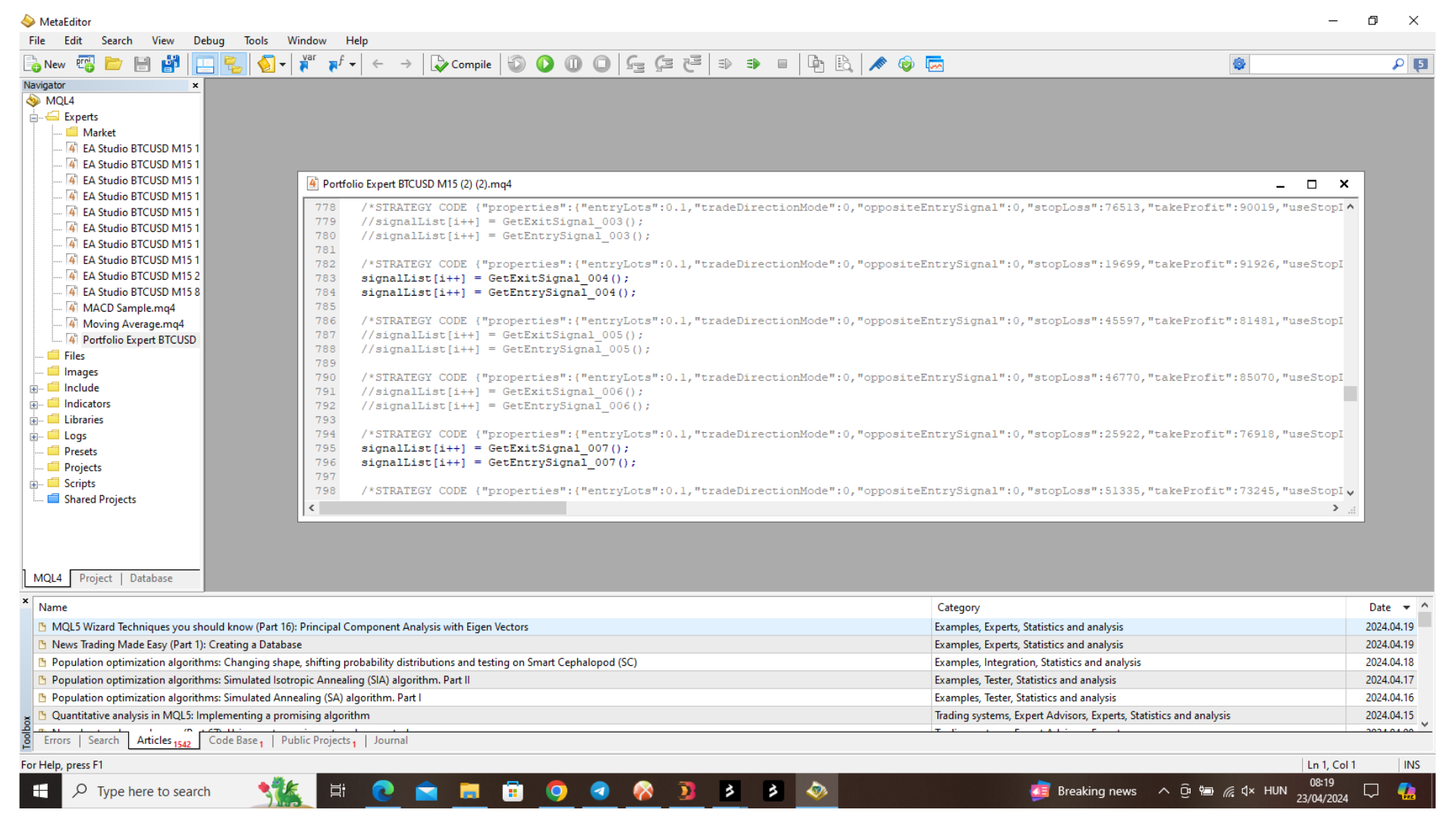
Metatrader 4 – Metaquotes Language Editor – then I clicked on Portfolio expert – scrolled down until I soo the number of the robots – then I placed 2 slashes in the front of them. They have then turned grey – and then suddenly 2 from the 3 I have “stopped” started to trading again XD
Please see pictures about the stopping steps.
Best wishes,
Edina
-
AuthorPosts
- You must be logged in to reply to this topic.