
Community Forums › Forums › 21 Day Program › 21 Day Program: General questions
Tagged: 21 day program, 21-Day Ultra Algo Trading Program, a, data source, leverage, posiciones, travel
- This topic has 169 replies, 52 voices, and was last updated 10 months, 2 weeks ago by
Stoyan Stoyanov.
-
AuthorPosts
-
October 10, 2023 at 1:00 pm #203988
Alan Northam
ParticipantHi Duane,
Thanks for your concerns.
Petko has a Facebook page and is on Youtube:
https://www.facebook.com/eaforexacademy/
https://www.youtube.com/channel/UCdJ3OOOoIyEy3SabxKbrPaw
However, the forum is a concentrated place where traders can get together and discuss their problems and experience. This keeps the place where traders get together from being fragmented all over the internet allowing all traders to see all traders questions. If some traders posted over here and other traders posted over there then you may miss some of the issues facing certain traders unless you scoured all the sites. This doesn’t make sense. Why have some traders posting on this site over here and others posting on this other site over there. Why not bring all traders to one place to discuss their issues and experiences. This is what the forum does!
Hope this helps,
Alan
October 10, 2023 at 1:38 pm #204002ParticipantHi Federico,
In my opinion MT4 is more user friendly than MT5.
Kind regards,
AlanOctober 10, 2023 at 2:10 pm #204011Glqose
ParticipantHello Everybody,
First of all I’d like to thank Petko for designing this very informative and helpful course. I have a few questions to ask.
Q.1 I have generated many strategies on the generator and I currently have them running on my demo account on MT4. Let’s say I want to stop all my strategies from trading so I disable Algo-Trading. What happens to all of the current standing orders that the EAs haven’t yet finalised? Will they auto finalise when they reach their stop-loss / stop-profit or will I just have open orders on my account indefinitely?
Q.2. Petko has said that MT4 can run up to 100 EAs on one terminal. What about running portfolio EAs? If I have 10 portfolio EAs running on 10 separate charts, with 10 EAs in each portfolio… does MT4 count it as 100 EAs or 10 EAs?
Q.3 This question is somewhat similar to Q.1. After a few days of running 60 EAs, my demo account has generated a net profit of about 300 euro. However, my EAs are constantly buying new equity in order to sell later, so I am actually at a loss of 400 euro. What can I do to make the EAs finalise all the trades when they seem fit without them opening any new trades? So if it was a live account, I could withdraw all the profit I’ve made.
Q.4 This is a question regarding hardware. I am using Forex VPS. I am running a VPS with 3GB of memory, 2 CPU cores and 80GB of SSD disk space. If I have multiple MT4 terminals open and I max them out with 100 EAs on each, how many operating MT4 terminals would my system be able to handle? What does MT4 actually use in order to function, Ram or the CPU or both?
Q.5 The generator on Expert Advisor Studio calculates strategies much faster on my Mac than on the VPS. Which piece of hardware impacts the generator’s performance? I’ve also noticed that it calculates strategies faster when you actually have the window open. If I log out of my VPS, would the generator keep generating them at the same pace or slower, as if I have the window closed?
Thank you Petko and anyone who answers my questions.
October 10, 2023 at 4:22 pm #204027ParticipantHi Glqose,
I can answer your questions for you.
A1. The EAs place TP and SL on the chart. So when you disable the EAs the current open positions on the chart will continue to remain active until either the TP or SL is hit.
A2. Yes, with 10 portfolios running with each one containing 10 strategies MetaTrader will count this as 100 EAs.
A3. Not sure if I understand this question however I will give it a try. I assume you have closed trades equaling a profit of 300 euros and you currently have open trades equaling a loss of 400 euros. If this is the case you can either manually close these trades and take the loss or continue to let them trade. If you do not want any new trades to be triggered you can press the Auto Trading button in the MT4 tool bar to disable trading.
A4. The limiting factor with your VPS is the amount of ram. With 3GB of ram you should only run 3 MT4/MT5 terminals. One MT terminal for 1GB of ram. My VPS has 4GB of ram and my VPS provider suggests a maximum of 4 MT terminals. I looked at your VPS provider and they suggest 3 MT terminals for the plan you have selected that has 3GB of ram.
A5. EA Studio runs on a webbrowser. Webbrowers uses a lot of ram. So the reason why EA Studio runs slow on the VPS is because your VPS only has 3GB of ram. Your MAC I am sure has much more ram. This is the reason why EA Studio runs faster on your MAC.
Hope I have answered all your questions.
Kind regards,
AlanOctober 10, 2023 at 7:28 pm #204052ParticipantHello Alan,
Thank you very much for answering the questions. Yes, you understood Q.3 correctly :).
Kind Regards,
Daniil
October 10, 2023 at 8:25 pm #204058aaronpriest
ParticipantRegarding Question 3, it is generally a really bad idea to just disable auto trading entirely or to remove the EAs, because now the trades are not being managed at all and will have to hit either full stop loss or full take profit before they are closed. By leaving trading enabled, and leaving the EAs attached to the charts, but setting Max Open Positions = 0, then you are preventing the EA from opening any new trades, but still allowing it to manage and close out open trades based on indicators, which is often more profitable than risking a full stop loss.
October 19, 2023 at 2:15 am #205515robert finn
ParticipantUnfortunately, when I tried to make my 20 minute mentor session for the program I ran into technical problems and was unable to connect. My apologies. So I still have questions. 1. I created some great bots with EA studio and put them on a demo account. However, they are not taking any positions. When I back test them for the same period they have been on the platform it shows that they took positions. I have checked everything. Mt4 says they are working and I understand the process clearly. I am not having problems getting other bots to work, I have them on several demos. This also happened for some of Petkos bots like the set of three portfolio EAs that he had us download and run in the course. I had them on a demo for more than 2 weeks and they wouldn’t take a position, but they would backtest. Any ideas on what might be causing this? I really want to resolve this as these are the best algo’s I have come up with that are geared specifically to current market conditions trading in the U.S. and the backtests are excellent. 2. What happens when you manually interrupt an algo trade? If you close a position opened by a bot does it cause any problems? Does anything particular need to be done to avoid issues? I have been letting the bots go and not stopping them, but I have manually traded for 5 years and see times when I am checking on trades that I should intervene to minimize loss and maximize profit. Any clarification on this would be great. 3. Can you upload an EA that was made on EA studio back onto the program and test/manipulate it further? I hadn’t gotten to that point yet. Thanks
October 19, 2023 at 9:53 am #205542ParticipantHi Robert,
Answer 1: Make sure you use a separate MT4 for each demo account and do not close them during the trading week. Also make sure you see a smiley face in the upper right hand corner of the chart.
Answer 2: You can manually close open trades. This will not affect the EA. The next time the EA sees a trade opportunity it will place a new trade.
Answer 3: You can upload an EA made by EA Studio back into EA Studio to backtest it or to make changes to it.
Alan,
October 21, 2023 at 9:28 pm #205959ParticipantHello Alan, I have all of my demos on their own mt4 platforms running on a VPS system so that they never shut off. All of the EA’s that are not taking positions have smiley faces. I have tried everything I can think of. I removed and reinstalled them and checked all of the inputs. I can’t find any reason for them not to work. Do you have any other possibilities? Thanks, Robert
October 22, 2023 at 12:08 am #205976ParticipantHi Robert: What broker are you using? When you backtest are you using the same account size and lot size as you have with your demo account? When you backtest the EAs how often are they taking trades? Based upon how often the EAs are placing trades during your backtesting, are you allowing enough time on your demo account for the EAs to place trades. If you are doing all these things and your EA still is not taking trades I would suggest you click on the Strategy tab in EA Studio, click on each indicator so it shows the settings, and show me all the screenshots so I can recreate the EA on my end so I can test it. Hang in there, we will figure it out!
Alan,
October 25, 2023 at 11:52 am #206946Daniel Angrish
ParticipantHi there,
I am currently have a few EA’s setup on a demo account and have moved the top performers to another demo account to test out “live” conditions. But I have come accross something which I am hoping can be explained here.
In the demo account EA #82631093 is the top performer and I moved to the demolive account once it passed the criteria of over 4 trades and 1.2 profit factor. I then monitored for 1 week.
After 1 week the results showed that the EA had placed 2 trades both losing. But when I check the stats in the demo account it shows it is the top performer winning 7 trades, losing 1.
So not sure why the EA on the demoliveaccount has placed 2 losing trades, but on the main demo account only 1 trade has been lost? I have checked the currency pairs, charts and everything is the same.
Any help would be appreciated.
Thanks,
October 25, 2023 at 12:12 pm #206950ParticipantHi Daniel,
In some cases demo accounts and live accounts with the same broker can have different servers. This can cause the results to be different. You can download the data from both accounts and compare them in a spreadsheet to see if they are different.
Alan,
October 25, 2023 at 5:06 pm #207047ParticipantHi Alan,
Thanks for your reply.
The live account isn’t actually a live account, it is a demo account which I am treating as a live account so should use the same servers as it is still a demo account.
October 25, 2023 at 7:12 pm #207086Michael Holt
ParticipantHi, thanks for the great content.
I’m enjoying everything so far.
I’ve just completed the portfolio lesson.
A couple of questions if i may.
1) is there anyway to upload the compiled portfolios from the course back into EA Studio to back test?
2) Why am i getting the order send error when i am trying to backtest on meta trader?
following pictures to help.
Trading on demo, £1000 with 1:100 leverage.
October 25, 2023 at 7:13 pm #207088Participant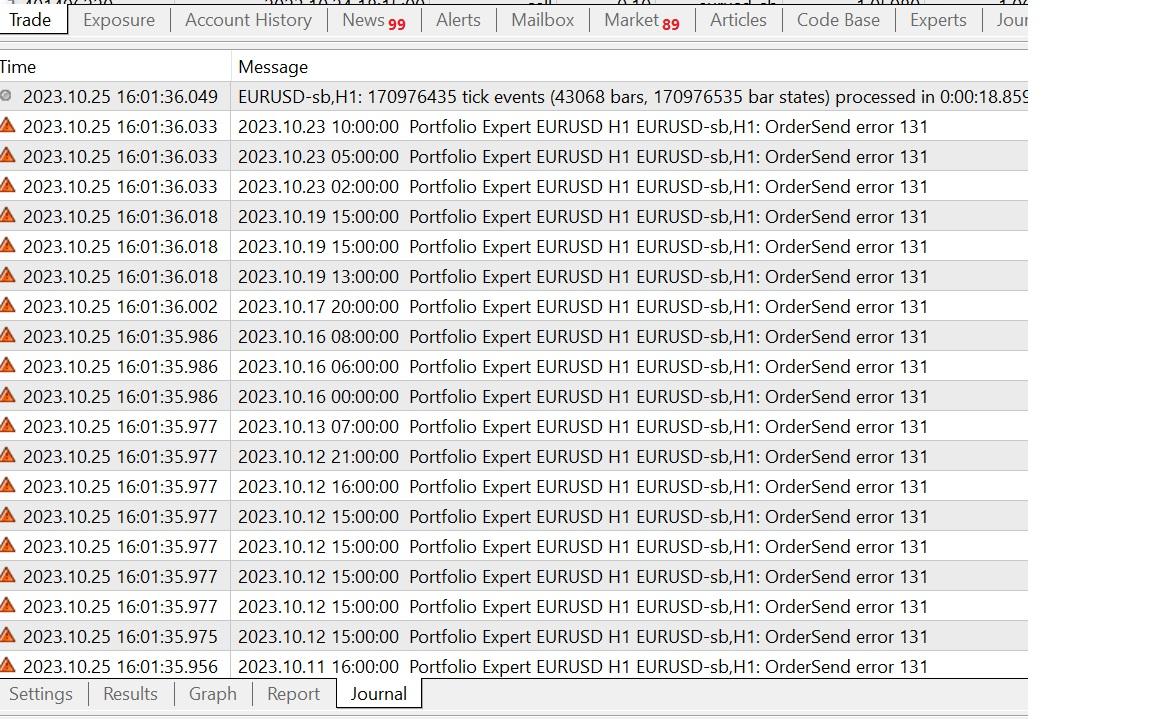
-
AuthorPosts
- You must be logged in to reply to this topic.